
Help with Chinese homework — even if you can't read a word of it.
Your child reads Chinese books aloud, practises characters and spelling lists, and works through worksheets. AI listens, marks and explains — and reports back to you in English.
Windows · Android · iOS · macOS — your family library, synced.
You want to help your child. You just don't read Chinese.
The homework comes home in characters you can't read. The spelling list means nothing to you. When your child reads aloud, you have no idea whether that sounded right. Zen Reader is the answer.
"I can't tell if they read it correctly."
AI listens to every character — and the tones — and scores the page.
"I can't test them on this week's 听写 list."
The app runs the test, marks a photo of their writing, and shows you the result.
"I can't explain a worksheet I can't read."
AI guides them through it with hints — you decide how much it may reveal.
"I don't know if they're actually improving."
Every result, trend and reading level, in plain English, on your phone.
You stay the parent — choosing the books, the word lists and the spelling lists. Zen Reader does the Chinese. It works alongside your child's school and tuition, on the books and lists their teachers already set.
Reading, characters, spelling and worksheets — in one place
Everything your child's homework asks of them, with AI doing the listening, marking and explaining.
Zen Reader is currently designed for Chinese and English — books, word lists, spelling lists, marking and reports work in both. More languages are on the way.
Read books aloud, get AI feedback
Your child reads a book aloud. Zen Reader follows along, marks every character, checks Mandarin tones, and gives a warm per-line report — always encouraging, never a red pen.
Did they understand it — or just say it?
Saying every character right isn't the same as following the story. After a scored reading, Zen Reader asks a few questions about what happened — in your child's own language, so a wrong answer means they missed the story, not that they couldn't read the question. The answers land in your report beside the score.
Practise characters & sight words — then test
Turn a character or sight-word list into flash cards and a friendly card game, then take a test that listens and scores each word. A family leaderboard makes revision something the kids ask for.
Practise spelling lists — then get tested
Scan the school's 听写 sheet or English spelling list and it becomes weekly lists. Your child practises by writing, saying or taking a dictation test — and AI marks a photo of their handwriting for you.
Catch b/d/p/q/g and 3/5/6/9 flips
Lots of children write b for d, or flip a 3 and a 5 — it's normal up to about age 7–8. Zen Reader spots it in your child's own handwriting, tells you which letters to work on and whether it's improving, and Flip Fixers drills one letter at a time with a say-it-while-you-write-it trick. Nothing in the drill is scored or saved.
AI help with Chinese worksheets
Snap a photo of a Chinese worksheet and Zen Reader guides your child through it — hints rather than answers, with exactly how much it reveals set by you.
Ask the AI — and it does the job for you
Jas, the in-app assistant, answers your questions in plain English — no manual, no support ticket. Ask it to do something and it will: name a batch of books from their covers, re-read the text and fill in pinyin and English, mark cover and credits pages as "not part of the reading", or clear away runs the kids started by accident. It shows you exactly what it's about to change, and nothing happens until you tap Run.
Parents see everything — and set the work
You add the books, word lists and spelling lists your child uses — then see every result: scores, tone notes, trends, badges, and a running count of the characters they can genuinely read, built from every reading they've done. Zen Reader tells you when they've read something and takes you straight to the report, and gentle daily reminders keep the habit going.
It reads along in clear Mandarin
Stuck on a word — or a whole page? Zen Reader reads it aloud and highlights each character karaoke-style, so your child hears exactly how it should sound, as often as they like. Turn on Echo and it pauses after every line for them to say it back. Nobody has to read Chinese to them.
Every book graded to a level
Zen Reader reads a book's characters and grades it automatically — HSK for Chinese and a reading grade for English. So you can finally answer the question you couldn't: is this one the right level for my child, or too hard?
One family, every child
Each child signs in as themselves, so every score, badge and trend is theirs alone. Invite the other parent, choose who manages what, and keep your family's reading private to the family.
Share the reading with a teacher
Link your child's school or tuition teacher so they can see how the reading is actually going between lessons. They see that one child's reading reports and nothing else — not your other children, not your library, not your account — and you can remove their access at any time. A teacher can ask for access too; nobody sees anything until you approve it.
Bring your own books
Import a PDF or scan a paper book with your camera. Zen Reader reads each page and adds pinyin and an English translation, building your family's own library out of the books you already own.
Practice mode saves nothing
Your child can stumble, repeat and try again with no score kept and no record of it — practice is theirs alone. Scoring mode is one tap away for when they want it to count. No neon streaks, no pressure; homework is stressful enough.
Private, synced & yours
Your family's library and history stay private and securely synced across phone, tablet and computer — and reading captured away from a connection syncs as soon as you're back. The app itself speaks 14 languages, and a PIN or fingerprint lock keeps little hands out of settings.
Looking for one thing in particular?
Whichever part of the week brought you here, there’s a page for it.
- A Chinese reading app that listens and corrects Every character marked, Mandarin tones included.
- An app for Chinese homework Worksheets guided with hints, at a level you set.
- An app for Chinese spelling The 听写 list dictated, written, and marked from a photo.
- An app for Chinese flash cards Cards, a family card game, then a test that listens.
- An app for English homework Reading aloud marked, spelling tested, reversals tracked.
- Mother tongue & language homework help All four, and exactly which languages are covered.
How it works
You set the work. Your child does it. AI handles the Chinese in between.
You add the work
Import a book as a PDF or scan it with your camera, and scan or type the week's word list and spelling list. Zen Reader reads each page and adds pinyin and a translation for you.
Your child practises and tests
They read aloud, run flash cards, practise spelling and get help on worksheets. AI listens, marks and explains — patiently, as many times as they need.
You see how it went
Per-character reports, tone tips, spelling marks, reading levels and progress trends — in English, on your phone, for each child.
Watch it all in one go
Fifteen minutes, start to finish — setting up, a real reading being marked, a spelling list, a worksheet, and the reports you get back.
Prefer the long version? Watch the full 15-minute walkthrough →
See it in action
Real screens from the app — no mock-ups. Everything in Chinese comes with pinyin and an English translation, so you can follow along too.
-
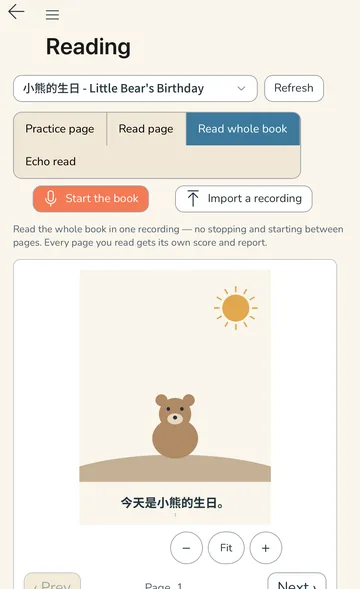
Check reading They read aloud; AI scores every character. -
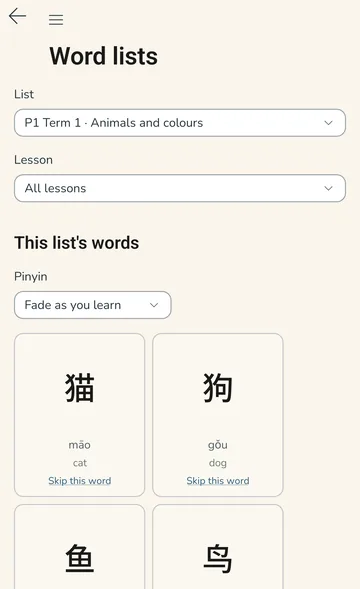
Word lists Flash cards, a card game, then a test. -
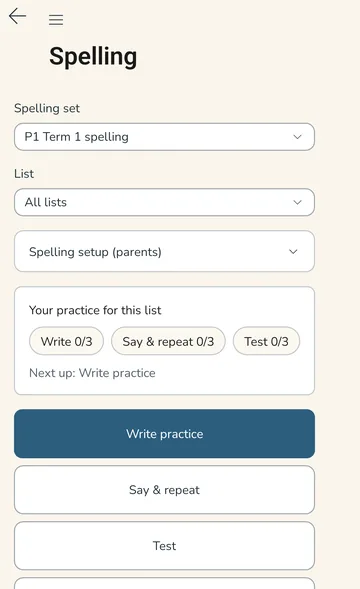
Spelling practice The week’s 听写 list — write, say or be tested. -
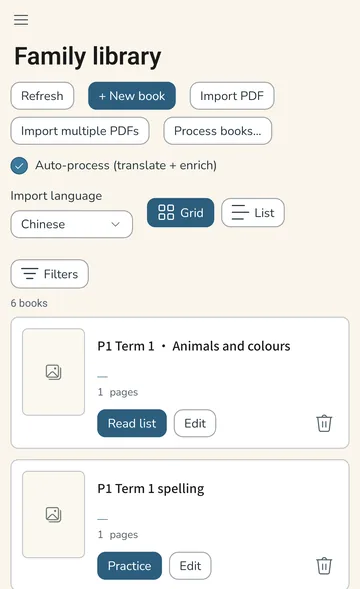
Family library Your own books, each graded to a level.
Captured on Android and iPhone. Zen Reader looks and works the same on Windows, iPad and Mac.
One library, every device
Zen Reader runs on the devices your family already uses, and keeps your library in sync.
Windows, Mac, Android, iPhone and iPad are all ready to download now — start your free trial →
Runs on Windows 10 (1809+), Android 6, iOS/iPadOS 12.2 and macOS 12 or newer. See full system requirements →
Give your child the help you can't
Chinese reading, characters, spelling lists and worksheets — with AI doing the listening and marking, and you seeing every result. Every plan starts with a free trial — no card needed.